Ban list sharing and review
Shared ban lists for game servers
WarGuardian keeps one ban list for all your servers. You can also follow a ban list from another community and review each ban before it applies.
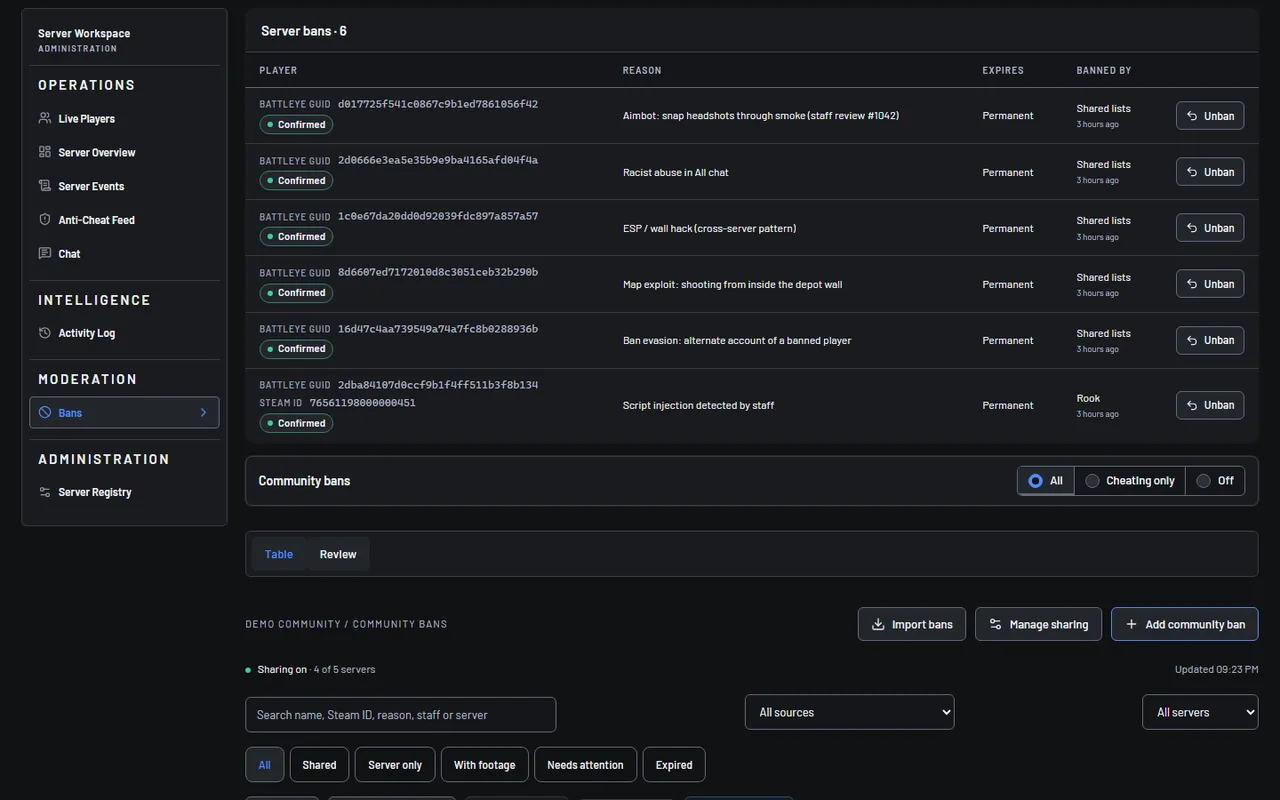
One ban list across your servers
Share a ban with your community, and it reaches each server that you select. Sharing is off until you turn it on.
- Each server takes All community bans, Cheating only, or none.
- A shared ban keeps its reason and its end time. Later changes reach the other servers automatically.
- Server coverage shows where each ban has applied and where it is still waiting.
- WarGuardian reads the ban list back from the server. A ban that the server lost is placed again.
Share a ban list with another community
A Ban List is a named collection of staff ban decisions. You give another community a share code, and they follow your list.
- Publish. Create a list and add the staff decisions that you want to share.
- Follow. The other community joins with your share code. The list starts in Review only, which places no bans.
- Review and activate. Their staff read each reason and its evidence. Then they choose the servers that take the list.
- A follower can exempt one decision and keep the rest of the list.
- A follower can pause updates. Bans that are already in place stay.
- Only bans that staff decided can be published. Automatic bans stay in their own community.
A new list is private. Only a community with your share code can follow it.
Public ban list directory
Make a list public, and it appears in the public ban list directory. Other communities find it there and follow it without a share code.
- Each list shows its name, its community and its number of active bans.
- Search by list or community, and filter to Verified or Official lists.
- Open a list to read each ban: the reason, the Steam ID, the staff member and the end time.
- Follow in review mode adds the list to your community. It places no bans until you activate it.
- The publisher chooses whether the attached evidence is public. Staff notes stay private.
The directory needs a sign-in. WarGuardian staff and approved Cinder accounts can read it.
Each ban keeps its reason and evidence
Staff can attach up to 10 files to a ban: MP4 or WebM video up to 100 MB, and images up to 10 MB.
A reviewer sees the reason, the staff member, the end time and the attached files. Internal staff notes stay private.
What each game supports
| Game | Community bans | Requires |
|---|---|---|
| WARDOGS | Shared bans and followed ban lists, by Steam ID. | RCON and the staff permission. |
| Arma 3 | Shared bans and followed ban lists, up to 5,000 bans per server. | BattlEye RCON. |
| DayZ | Shared bans and followed ban lists, up to 5,000 bans per server. | BattlEye RCON. |
| Arma Reforger | Community bans as native bans, up to 1,000 bans per server. | The admin RCON permission, and a Steam ID that the WarGuardian Agent links to the player. |
Review bans on your phone with Cinder
Cinder Ban Review shows one case at a time with its clips, photos and staff notes.
- Accept a ban, decline it or decide later.
- Cinder is free and needs no game server. A community applies with Discord and waits for approval.
- An API imports staff cases and exports the bans that you accepted.
Bring your existing bans
Import a BattlEye bans.txt file, a CSV file or a WarGuardian export. Each file can be up to 10 MiB.
WarGuardian shows what it found before anything changes. An imported ban with no known end time is permanent.
Common questions
Does following a ban list ban players at once?
No, a followed list starts in Review only. It places bans after you choose the servers and confirm.
Is there a public ban list directory?
Yes, a community can make a ban list public. Signed-in WarGuardian staff and approved Cinder accounts can browse the directory and follow a list.
Can I refuse one ban from a list that I follow?
Yes, exempt that decision. The rest of the list stays in place on your servers.
Does an unban on one server unban the player everywhere?
No, an unban covers that server only. Revoke the shared ban to remove its copies from the other servers.
How much does it cost?
Your first server is free. See WarGuardian pricing for the current community plans.
Run your community with WarGuardian
Connect one server free. Then invite your staff.